
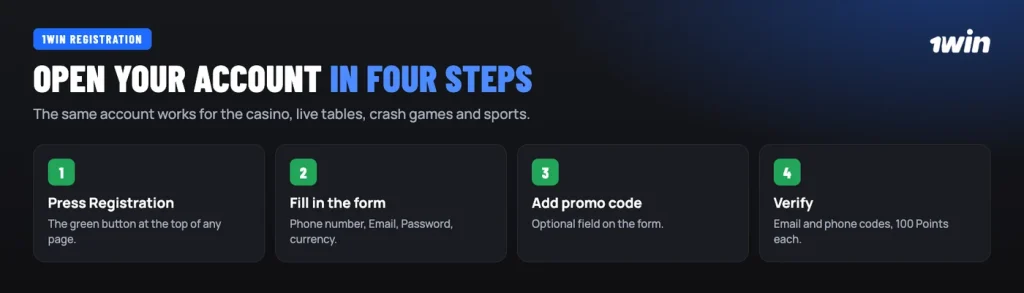
1win registration runs through a single form. You choose the account currency, enter a phone number and an email address, set a password and press Register. That is the whole sign-up. Everything else happens inside your profile afterwards: a code verifies your email, another verifies your phone, the cashier opens for deposits, and the welcome package waits in Bonuses until your first top-up.
For players in Malaysia the account currency is ringgit (MYR) by default, so balances, deposit minimums and withdrawal amounts all read in RM. Below you will find the form field by field, how to log back in, what identity verification asks for, and how money moves in and out.
1win sign up form, field by field
The 1win sign up form opens from the green Registration button in the top right corner. It is short, but two of its fields have consequences later: the account currency decides your welcome offer, and the phone number becomes one of your two login options. Fill both in carefully rather than quickly.
- Press Registration. The button sits top right, next to the grey Login button, and opens the sign-up form over the lobby.
- Choose the account currency. Select a ringgit account for Malaysia. A cryptocurrency account is the other option, and it changes the welcome package to up to 600%.
- Enter your phone number. Use the country code, so +60 followed by your Malaysian number. A code sent to this number verifies it later.
- Add your Email. This is the address that receives your withdrawal confirmation codes, so use one you can always open.
- Set a Password. At least eight characters. Mix letters, digits and symbols, and do not reuse a password from another site.
- Add promo code (optional). Use the Add promo code field only if you have a code from one of our social media posts. Leaving it empty does not affect the welcome package.
- Accept the User Agreement. Tick the checkbox. Registration is for players aged 18 and over, and one person may hold one account.
- Press Register. The account is created and you are signed in, with the welcome offer waiting in Bonuses.
If your phone or email already belongs to an account, use Log in instead of creating a second profile: extra accounts opened for bonuses count as bonus abuse.
One-tap sign up with Google, Telegram and other accounts
Under the form there is a one-tap row that creates the account from a Google, Telegram or other account. Check that a ringgit account is selected in the currency field before you tap, because the currency still decides your welcome package. From then on, that same account signs you in.
Why the currency choice matters
The welcome package follows the currency you pick at sign-up. A ringgit account receives up to 500% and 500 free spins spread over the first four deposits: 100% with 70 free spins, then 120% with 100 free spins, then 130% with 150 free spins, then 150% with 180 free spins. A cryptocurrency account receives up to 600% with the same 500 free spins.
So the decision is simple. Choose ringgit if you deposit from local methods and want your balance in RM; choose crypto only if you already hold coins and prefer the higher percentage. The minimum deposit that activates each step, the wagering terms and the expiry are printed on the bonus card itself. Every step of the four-deposit welcome has its own card, so you can read it before you commit any money.
1win login and password recovery
Press Login in the top right corner. The form has two tabs, Phone and Email, so you can sign in with either detail you registered. Enter your Password and press Log in. If the password has slipped your mind, Forgot your password? under the field starts the recovery.
Accounts created with Google or Telegram log in the same way they were created, through the one-tap row.
One safety habit pays off from day one. Sign in only through the Login button here or inside the 1win app you installed yourself, and never through a link someone sends you. We never ask for your password in chat, and our staff never need it to help you with a payment or a bonus. Once you are signed in, the main lobby gives you the same account, balance and bonus list on every device.
1win KYC and verification check
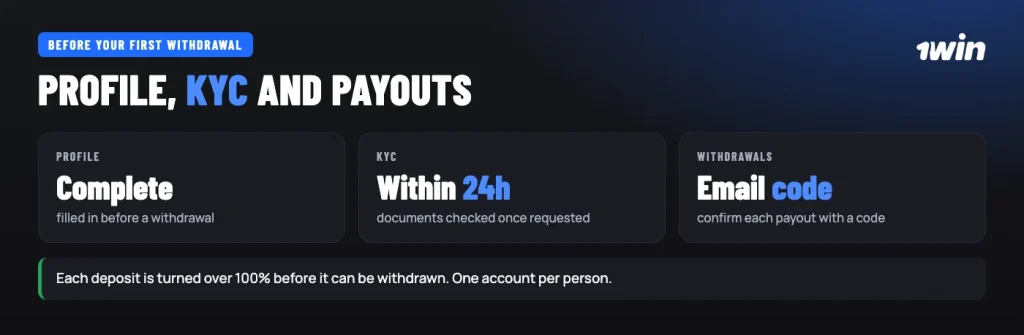
Verification happens in two stages, and only the first one is immediate. 1win verification of your email and phone number is instant: you enter the code sent to each, and the detail is confirmed. Both are also small 1win Points tasks, paying 100 Points for a verified email and 100 Points for a verified phone number.
The second stage is the identity check, known as KYC. Depending on your case we may ask for a government-issued identity document, such as a passport or a national identity card (in Malaysia, MyKad is the national identity card), proof of address, and a selfie or identity confirmation photo. Upload clear original photos with the whole document in frame, no editing, no blur and no glare across the data page. Most checks are completed within 24 hours of submission, and take longer only when extra information or a manual review is needed.
Two practical points save time later. Fill in your profile details before you request your first withdrawal, because the cashier expects a complete profile. And remember that identification may be requested once your total withdrawals pass USD 500 or the ringgit equivalent, so it pays to verify early.
Day one
Verify your email and phone the day you register, and send your identity documents before your first large withdrawal rather than after you request it. Then the check does not hold up your first payout.
The form takes a few fields, and the welcome package starts with your first deposit.
1win deposit methods and timing
| Detail | 1win |
|---|---|
| Account currency for Malaysia | Ringgit (MYR) by default |
| Deposit methods | Local payment methods and cryptocurrencies, listed in your cashier |
| Verification | Within 24 hours in most cases |
| Withdrawal confirmation | Code sent to your email |
To top up, open your profile, press Deposit, choose a local payment method or a cryptocurrency, enter the amount and follow the instructions on screen. Which methods appear depends on your country, your account currency and our payment providers, so treat the cashier as the authority: it lists every method available to your ringgit account together with its minimum and maximum in RM. If you deposit for a welcome step, check the minimum on the bonus card first, since a bonus card and a payment method can set different floors.
Crypto deposits work from a different part of the cashier. More than 15 cryptocurrencies are supported, commonly BTC, ETH, USDT and XRP, alongside options such as LTC, TRX, TON and BNB Chain. Send only the selected coin on the selected network to the address shown, because a transfer on the wrong network may not be recoverable.
One rule applies to every method: payments must come from a card, wallet or bank account in your own name, and we do not accept cash. A deposit funded by a friend, a relative or any third party puts the resulting winnings at risk, so pay from your own instrument even when it is less convenient. This is also the moment to think about the size of your sessions, because setting a deposit limit through support is easier before a losing run than during one.
Deposit times by method
| Method | Time to credit |
|---|---|
| Local payment methods | Instant after a successful payment, up to 15 minutes if the provider needs extra processing |
| TON | 30 to 60 seconds |
| BEP-20 | 1 to 2 minutes |
| TRC-20 | 1 to 3 minutes |
| ERC-20 | 3 to 10 minutes |
| BTC | 15 to 60 minutes |
The spread between networks is normal blockchain behaviour: each transfer waits for confirmations, and busier networks confirm more slowly. If you deposit with USDT, the network you choose matters more than the coin, since TRC-20 clears in minutes while ERC-20 takes longer. For a time-sensitive top-up, a local method or a fast network is the practical choice.
How a 1win withdrawal works
A withdrawal starts in the same place as a deposit. Open your profile, press Withdraw, choose a payout method, enter the amount and confirm the request with the code we send to your email. The code is the security step on every payout, which is why the email address on your account needs to be one you can open quickly.
Withdrawal times
- Cryptocurrency: up to 15 minutes, with Bitcoin around 30 minutes on average.
- Bank cards and e-wallets: up to 24 hours.
- Additional processing by a bank or payment system: up to three business days on top.
Those last three days are not our queue. They belong to the bank or payment system handling the final leg, which is why a payout can show as sent on our side while the money has not yet landed in your account.
Before your first withdrawal
Withdrawals unlock once each deposit has been played through at least once, meaning 100% of its amount. Funds that were never played can carry a commission when you withdraw them, so if you deposit and change your mind, place your bets before requesting the money back rather than after.
An active bonus is the other thing to settle first. Withdrawing while a bonus is active or waiting for activation cancels that bonus, so either finish the wagering or accept the loss of the offer before you press Withdraw. Very large wins, above USD 50,000 or the equivalent, may be paid out under an individual daily limit.
If a request sits as pending, look at four reasons first: a security check, processing on the provider or bank side, verification that is not finished, or bonus wagering still in progress. Open Payment History to see where the request stands. When the entry has not moved and none of those reasons apply, message Support 24/7 in the live chat with the payment date and amount, and we will trace it.
FAQ
How do I register at 1win from Malaysia?
Press Registration, choose the ringgit (MYR) account currency, enter your phone number with the +60 code, add your Email and a Password of at least eight characters, tick the User Agreement box and press Register. The account opens immediately and you can verify your contact details straight away.
Can I sign up with a Google or Telegram account?
Yes. Under the form there is a one-tap sign-up row with Google, Telegram and other accounts. The account is still created in a currency, so check that a ringgit account is selected before you confirm. Later you log in with the same social account.
What documents does verification need?
Depending on your case: a government-issued identity document such as a passport or a national identity card, proof of address, and a selfie or identity confirmation photo. Photos must be clear originals with the whole document visible, with no editing, blur or glare.
How long does verification take?
Email and phone verification is instant once you enter the correct code. An identity check is completed within 24 hours of submitting documents in most cases, and takes longer only when extra information or a manual review is needed.
How long does a 1win withdrawal take?
Cryptocurrency payouts take up to 15 minutes, with Bitcoin around 30 minutes on average. Bank cards and e-wallets take up to 24 hours, and additional processing by a bank or payment system can add up to three business days.
Why is my withdrawal still pending?
Common reasons are a security check, processing on the payment provider or bank side, verification that has not been completed, or bonus wagering that is still unfinished. Open Payment History to see the current status, then message Support 24/7 if the entry has not moved.